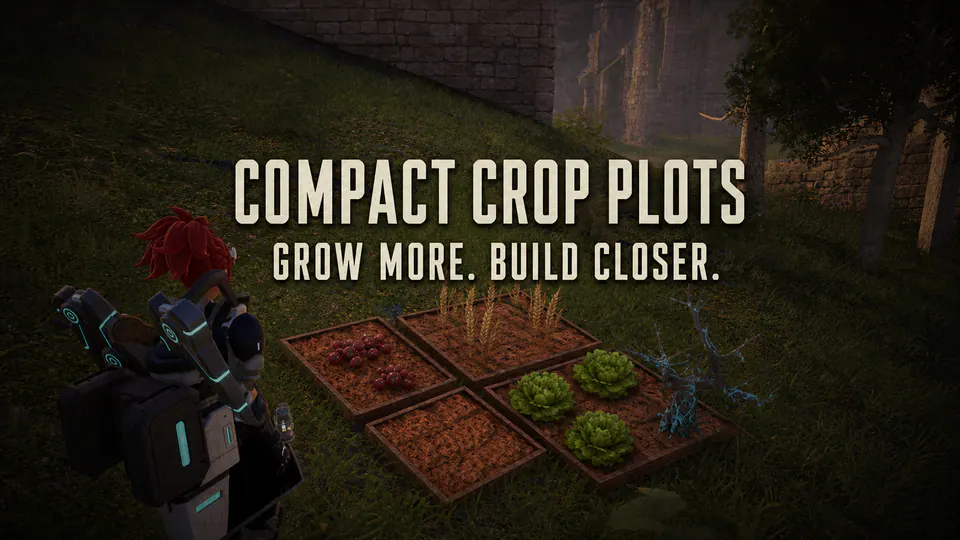
Compact Plantations and Smaller Crop Plots gives Palworld's large plantations a much smaller horizontal footprint without touching crop balance.
Wheat, Tomato, Lettuce, Potato, Carrot, Onion, and Skill Fruit plots use the same ground-mesh scale and compact bounds already used by the game's native Berry Plantation. Wheat and Lettuce growth meshes are fitted to the smaller soil bed in every growth state. The package also covers the current Grade01, Grade02, and Grade03 crop-plot Blueprints for content that enables them.
The mod does not change recipes, unlock levels, seed costs, work amounts, growth time, yields, crop counts, or save data. It is a small PalSchema Blueprint patch with no Lua polling and no replacement pak.
Features
- Compact 65% ground mesh for seven standard and three current Grade plot
- Native Berry Plantation dimensions used as the sizing reference
- Smaller placement, navigation, and worker bounds matched to the plot
- Wheat and Lettuce visuals fitted across planted, growing, and harvest states
- No recipe, progression, timing, yield, or save edits
- Explicit client and Windows-server package rules
- Exact differential coverage of the supplied working mod
- Deterministic archive with scanner and byte-equality tests
Requirements
Install the current PalSchema release and the exact Palworld-specific UE4SS
build that release requires. PalSchema 0.6.0 with UE4SS commit c2ac246 is the
locally inspected compatibility baseline. PalSchema 0.6.1 is the latest
upstream release as of 2026-07-26 and requires its matching UE4SS update.
Do not mix a newer PalSchema DLL with an older UE4SS fork. A mismatched runtime can prevent Blueprint patches from loading even when the JSON is valid.
Installation
PalMods or Workshop package workflow
- Install and enable the matching UE4SS and PalSchema dependencies.
- Install
CompactCropPlots_v1.0.0-beta.1.zip. - Enable
CompactCropPlots. - Install and enable the same package on the host or Windows server.
- Restart Palworld fully.
- Check the fresh PalSchema/UE4SS log before loading an important world.
Manual Steam layout
Place the deployed mod folder at:
text
Pal\Binaries\Win64\ue4ss\Mods\PalSchema\mods\CompactCropPlots
That folder must contain blueprints\compact-footprints.jsonc and
blueprints\compact-crop-visuals.jsonc. Do not add another wrapper folder.
Multiplayer
Install the package on both the host or server and every client. The server handles authoritative placement and work behavior. Clients need matching Blueprint values for construction previews, collision expectations, and crop visuals. Mixed installs are not supported.
Compatibility and conflicts
The touched-data surface is intentionally narrow:
BuildWorkableBounds.BoxExtentCheckOverlapCollision.BoxExtentVirtualMeshCollision.BoxExtentMesh.RelativeScale3DCropISM.RelativeScale3Dfor Wheat and LettuceGrassISM.RelativeScale3Dfor Wheat and LettuceGrowupISM.RelativeScale3Dfor Wheat and Lettuce
Another PalSchema, pak, or Blueprint mod that changes any of those properties on the same classes is a conflict. Test this package alone. Load order is not a safe compatibility strategy for two mods that disagree on the same value.
The mod does not patch enemy-camp plantations, crop data-table rows, recipes, technology, work amounts, crop counts, or yields.
Save impact and removal
Compact Crop Plots does not write custom save fields or sidecar files. It changes class defaults while the game is running.
Back up important worlds before installing or removing any building mod. To remove:
- Stop the game or server.
- Disable or remove
CompactCropPlots. - Restart fully.
- Load a copied save first and inspect affected structures.
Do not dismantle important plots solely as an uninstall step unless live testing shows a specific structure needs rebuilding.